Tuesday, April 11, 2023

 Modifying a Golang program to run on AIX and IBM-i

Rclone is a command-line program to manage files on cloud storage. It is a feature-rich alternative to cloud vendors’ web storage interfaces. Over 40 cloud storage products support Rclone including S3 object stores, business & consumer file storage services, as well as standard transfer protocols.

I’m a big Rclone fan. 

Helping migrate AIX and IBM i to the cloud, I spend a lot of time working on helping customers move data. Lots and lots of data. One of my favorite solutions is Rclone. It’s super easy to drop a Linux on Power VM in and have Rclone be the intermediary. 

But that extra hop takes extra time and wouldn’t it be great to go directly from IBM i to Azure Blob or any of the other dozens of places Rclone will take you?

Rclone is written in Go (also called Golang or Go language), an open-source programming language used for general purposes. Google Engineers developed Go to create dependable and efficient software. Most similarly modeled after C, Go is statically typed and explicit. The language was designed by taking inspiration from the productivity and relative simplicity of Python, with the ability of C.

You can install Go on AIX, and almost at once, find that only very simple Go programs run without failing for missing some module. I set about finding and fixing the missing or broken modules and adjusting things like memory allocation, which is a tad bit different on AIX. Turns out it was not the worst of things as I’ve always been a “take-it-apart-to-find-out-how-it-works” guy.

What about IBM i and Go? Well, that was a “no” right out of the box. I spent another month or so looking for a way or even a mention of Go on IBM i. Nothing. And then one of my co-workers Richard asked if I had tried it in PASE. I am also a bit PASE fan since I’m almost entirely an ssh and command line user, and that’s how I get my BASH shell on IBM i.  

PASE is the runtime system on IBM i where you can run AIX-compiled code. I thought, of course, this is it!! But. There is always a “but”. Turns out that IBM i also has a tad bit different memory scheme. So, duck…duck…go…again. 

PASE executables need to be at a relative version of AIX – ie: AIX 7.3 is IBM i PASE 7.4 and you need to iron out a couple of other small details like where /etc/resolv.conf is on IBM-i, but I made it work in the end.  

You can download the executables for AIX 7.3 and IBM i 7.4 from Github:

https://github.com/skytap/rclone

And, of course, the “screenshot or it doesn’t exist” – Rclone on IBM i
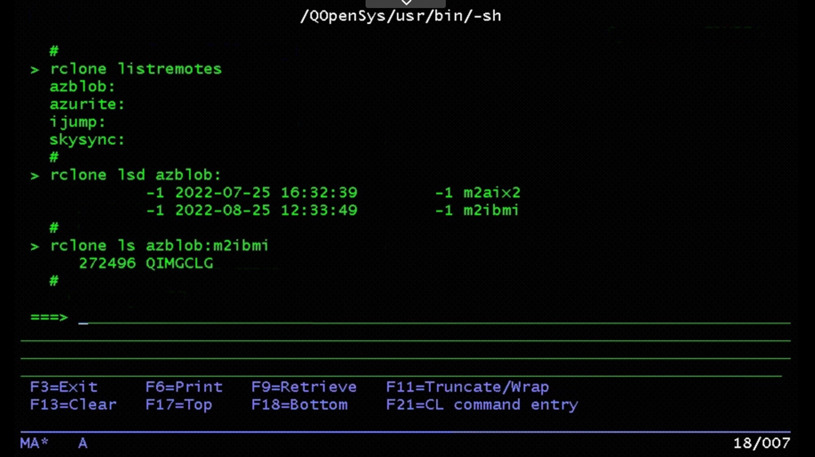
rClone on IBM i

Monday, March 6, 2017

Powershell module for Skytap

Wow, haven't posted anything here in awhile.  Here are a couple of things I created but never got around to putting on my blog.

I love how Powershell creates objects from rest-api responses.  I do a lot of python and I love "requests" but it gives me back a glob that I then have to fit into a class.

https://www.skytap.com/blog/new-powershell-module-increases-feature-accessibility/

https://github.com/skytap/Powershell_Module_for_Skytap

I'm also overdue on several enhancement requests to the module and I promise I'm going to get those finished soon.

Wednesday, October 29, 2014

NetSuite lists in Talend

NetSuite Business Software: Accounting, CRM, Ecommerce, ERP, Inventory

On the Talend Exchange there are connectors for NetSuite.  Great!
Plug in the user and password and grab a customer record.  Easy! 
Output the customer address list.  Fail!

What?  The address book is returned as an Object instead of rows with columns.
Ok, let's just send it thru the xml component and decompose it.  Not!
It's a NetSuite java object at this point and not xml.

So what do we do ?  Since the NetSuite java classes are available by virtue of the connector, we should be able to just use a tJavaRow component, assign it to the proper type (CustomerAddressbookList), and send it on down the stream.  "Should" is the operative word here, but we can't because tJavaRow is looking to output one row for each row that is input, and the Addressbook list object has one or more address book entries.

globalMap to the rescue !

1) We'll use tJavaRow to get the addressbooklist broken into an addressbook array and put that object into a globalMap object.  We'll also put the size of the array into a globalMap variable to use as our loop iterator.

globalMap.put("InternalId",input_row.InternalId);
globalMap.put("ExternalId",input_row.ExternalId);

CustomerAddressbookList ablist = (CustomerAddressbookList)input_row.AddressbookList;
CustomerAddressbook[] aba = ablist.getAddressbook();

globalMap.put("caba", aba);
globalMap.put("caba_Length", aba.length);


2) Our tLoop using the length


3) And finally a tJavaFlex to get the fields we want - notice that the array reference is the tLoop value variable


This methodology can be used to decompose any of the many NetSuite list objects.

Enjoy

NetSuite Business Software: Accounting, CRM, Ecommerce, ERP, Inventory

Friday, June 27, 2014

Talend connectors for FieldAware

I've recently finished development of my Talend connectors for FieldAware and will be posting them to the Talend Exchange. The connectors allow drag-n-drop creation of Talend jobs that can provide easy integration between cloud or premise based services like Salesforce, Microsoft Dynamics CRM, Netsuite, etc. Pretty much anything with a web or database interface can be easily hooked to FieldAware to manage your field service via mobile applications. The connectors support standard CRUD operations as well as list iterations into the stream flow. This was quite a fun project since Talend custom connectors are written in java to generate java when they are used in a job flow. A job flow would be something like taking Salesforce customer and scheduling work thru FieldAware and then returning the information (even before and after photos) to Salesforce. You might even send the invoice information on to Quickbooks. Mobile applications are changing the world and cloud based FieldAware and our integrations are leading the way.

Friday, May 2, 2014

Using Powershell to integrate with MS Dynamics CRM Online

listAccounts.ps1
The Dynamics CRM SDK comes with samples of using Powershell, but they're all around admin functions and I needed integration functions. Worse yet, my project was Dynamics CRM Online and the examples were all for on-premise.
So begins another episode of HACKERMAN, champion of the oppressed codernauts.
                                                      
 [reflection.assembly]::loadfile("C:\CRMSDK\Microsoft.Crm.Sdk.proxy.dll")                                                              
 [reflection.assembly]::loadfile("C:\CRMSDK\Microsoft.xrm.client.dll")                                                                 
 [reflection.assembly]::loadfile("C:\CRMSDK\Microsoft.xrm.portal.dll")                                                                 
 [reflection.assembly]::loadfile("C:\CRMSDK\Microsoft.Crm.Outlook.Sdk.dll")                        
 [reflection.assembly]::loadfile("C:\CRMSDK\Microsoft.xrm.sdk.deployment.dll")                                                         
 [reflection.assembly]::loadfile("C:\CRMSDK\Microsoft.xrm.sdk.dll")                                                                    
 [reflection.assembly]::loadfile("C:\CRMSDK\Microsoft.xrm.sdk.workflow.dll")                                                           
 [reflection.assembly]::loadfile("C:\CRMSDK\antiXsslibrary.dll")  


 $creds = New-Object ServiceModel.Description.ClientCredentials   
 $creds.UserName.UserName = "mmeasel@FieldAware228.onmicrosoft.com"  
 $creds.UserName.Password = "password123" 
 $devcred = New-object ServiceModel.Description.ClientCredentials                                                                      
 $devcred.UserName.Username = "FieldAware"                                                                                             
 $devcred.UserName.Password = "password123"   
 
 $crmConnection = New-Object Microsoft.Xrm.Client.CrmConnection 

 $crmConnection.ServiceUri = "https://fieldaware228.crm.dynamics.com"
 $crmConnection.ClientCredentials = $creds 
 $crmConnection.DeviceCredentials = $devcred 
 $crmConnection
 
 
 $orgService = New-Object microsoft.xrm.client.services.organizationservice($crmConnection)
 
 $orgService.Initialize 


 $qex = New-Object Microsoft.xrm.sdk.query.queryexpression
  $qex.entityname = "account"
  $acols = new-object microsoft.xrm.sdk.query.columnset
  # just get the ones we need
  $acols.addColumn("name")
  $acols.addColumn("address1_telephone1")
  $acols.addColumn("address1_fax")
  $acols.addColumn("accountnumber")
  $acols.addColumn("description")
  $acols.addColumn("emailaddress1")
  $acols.addColumn("websiteurl")
  $acols.addColumn("address1_addressid")
  $acols.addColumn("address1_name")
  $acols.addColumn("address1_line1")
  $acols.addColumn("address1_stateorprovince")
  $acols.addColumn("address1_postalcode")
  $acols.addColumn("address1_country")
  $acols.addColumn("primarycontactid")
  
  $qex.columnSet = $acols
  $requestMultiple = new-object microsoft.xrm.sdk.messages.retrieveMultiplerequest
  $requestMultiple.Query = $qex
  $resultset = new-object microsoft.xrm.sdk.entitycollection
  $resultset = $orgService.Execute($requestMultiple)
  $accountId = [Guid]::Empty 
  $acctdata = @{}
  
  ForEach ( $ent in $resultset.Entitycollection.Entities ) {
        $Customer = @()
        $Location = @()
        $Contact = @()
        $accountId = $ent.id
        $acctdata = $orgService.retrieve("account", $accountId, $acols)
        
        $Customer += [pscustomobject] @{
                        dynAcctId = $accountId
                        name = $acctdata.attributes['name']
                        phone = $acctdata.attributes['address1_telephone1']
                        fax = $acctdata.attributes['address1_fax']
                        account = $acctdata.attributes['accountnumber']
                        notes = $acctdata.attributes['description']
                        email = $acctdata.attributes['emailaddress1']
                        website = $acctdata.attributes['websiteurl']
                                                }
        $Location += [pscustomobject] @{
                        dynLocId = $acctdata.attributes['address1_addressid']
                        name = $acctdata.attributes['address1_name']
                        streetName = $acctdata.attributes['address1_line1']
                        locality = $acctdata.attributes['address1_stateorprovince']
                        postcode = $acctdata.attributes['address1_postalcode']
                        country = $acctdata.attributes['address1_country']
                        atype = "branch"  
                                                }
        $dynContactRef = $acctdata.attributes['primarycontactid']
        if ($dynContactRef) {
        $dynContact = $dynContactRef.Id
        
        $ccols = new-object microsoft.xrm.sdk.query.columnset
        $ccols.addColumn("firstname")
        $ccols.addColumn("lastname")
        $ccols.addColumn("emailaddress1")
        $ccols.addColumn("telephone1")
        $contactdata = $orgService.retrieve("contact", $dynContact,$ccols)
        #$contactdata
        $Contact += [pscustomobject] @{
                        dynContactId = $dynContactRef.Id
                        firstName = $contactdata.attributes['firstname']
                        lastName = $contactdata.attributes['lastname']
                        email = $contactdata.attributes['emailaddress1']
                        phone = $contactdata.attributes['telephone1']
                                }
                        }
                
         $Customer
         $Location
         $Contact
  
  }


Thursday, February 13, 2014

JSON and CSV

Yesterday I wrote a bit of Python to create new records in an application that exposed a JSON api. I decided to use csv files as input since that's the format that most of our customers use when exporting data. It's really well suited for creating json name=value pairs when using the python "request" libraries. The column headers are used as the names and the column values are used as, well, the values.

Code snippet:
mllc.py
167 def newCustomer(custInputFile):
168         print "adding Customers from " + custInputFile
169         with open(custInputFile, 'rb') as cfile:
170                 reader = csv.reader(cfile)
171                 rownum = 0
172                 for row in reader:
173                         #print row
174                         if rownum == 0:
175                                 header = row
176                         else:
177                                 colnum = 0
178                                 payload = {}
179                                 for col in row:
180                                         cname = header[colnum]
181                                         cval = col
182                                         payload[cname] = cval 
183                                         colnum += 1
184                                 Customersurl = url + '/customer/'
185                                 response = requests.post(Customersurl, data=json.dumps(payload), headers=headers) 
186                 
187                                 # Check for HTTP codes other than 201
188                                 if response.status_code != 201: 
189                                     print('Status:', response.status_code, 'Problem with the request. Exiting.')
190                                     exit()
191                         rownum = +1

Wednesday, January 15, 2014

Powershell write-epa function for psEPA

 The psEPA is an extension of the Introscope .Net Agent that runs powershell scripts and collects the output as input to Introscope.  I wrote it because using the standard java based EPA wasn't always practical.  It was one of those necessity things I found I needed when building the latest iteration of the Citrix field pack.

So, I wanted an easy way to get metrics out of a cmdlet or pipe without having to go thru formatting.  And I really wanted it to be a function or pipeline section you could use generically.

Hence the write-epa function

This:  PS C:\Users\meaje04> get-process | write-epa -mname Name -mvalue CPU -longname TestMachine`|

Name – the object property name to use for the metric name
CPU – another object property name to use for the metric value
TestMachine`| - a literal value to prepend to the metric name

Gives this:  (formatted for epa)

TestMachine|AcroRd32:CPU=54
TestMachine|AcroRd32:CPU=0
TestMachine|ApMsgFwd:CPU=54
TestMachine|ApntEx:CPU=1
TestMachine|Apoint:CPU=5
TestMachine|armsvc:CPU=0
TestMachine|audiodg:CPU=4763
TestMachine|BcmDeviceAndTaskStatusService:CPU=2
TestMachine|cam:CPU=0
TestMachine|CdfSvc:CPU=0
TestMachine|communicator:CPU=135
TestMachine|conhost:CPU=0

And this:  PS C:\Users\meaje04> (Get-Counter "\\$env:computername\PhysicalDisk(*)\Current Disk Queue Length").Countersamples | write-epa -mname InstanceName -mvalue CookedValue -longname Disks`|

Gives this:
Disks|0 c::CookedValue=0
Disks|_total:CookedValue=0

The code:

 1 # take input object and write metric for psepa
 2 #   get-process | .\write-metric.ps1 -mname "processname" -mvalue "handles" -longname "Windows`|Processes`|" 
 3 #   Use any piped object as input, specify the metric name with -mname, specify the value with -mvalue,  specify a long name with -longname
 4 function write-epa {
 5 param( [string]$mname = "name", [string]$mvalue = "value",[string]$longName="Default`|") 
 6 begin { $x2 = 0; }
 7 process {
 8         foreach ($thing in $input) {     
 9                  $mn = $thing."$mname"
10                  $mv = $thing."$mvalue"
11                  $isNumber = [System.Int32]::TryParse($mv, [ref] ($x2))
12                 if ($isNumber) { [Int]$mvv = $mv } else { [string]$mvv = $mv }
13                 $smetric =  $longName + $mn + ":" +$mvalue.toString() + "=" + $mvv
14                 write-host $smetric 
15                 
16 
17         }
18  }